tiistai 25. elokuuta 2015

Paying with Bitcoin in K-market Mansku (Helsinki, Finland)

Hey Lidl, beat this!

In Helsinki, Finland there are not too many stores which accept Bitcoin. However, according to bitcoin map service from Bittiraha.fi three groceries (K-market Mansku, K-market Pietari and K-market Jätkäsaari) all handle Bitcoin. This was something I wanted to try!

Getting ready

Off I went and reactivated my bitcoin wallet which has been lying on the Internet for ages with no use at all. Ok, password was not forgotten. What a good start!

My bitcoin wallet

After re-opening my wallet I realized there was hardly any money left. There are many places in Helsinki where you can exchange euros to bitcoins. One of them is in Levykauppa äx. It's a record store in Asematunneli near railway station and subway. I've been there once and exchanged 5 euros to bitcoins. There are instructions available and the stuff of the store helps if needed. Just make sure you have some euros and bitcoin wallet with you and you remember the password of your wallet.

Levykauppa äx (Record store X), Asematunneli, Helsinki

Exchanging euros to bitcoins
in Levykauppa äx

Paying in K-market Mansku with bitcoin

I was ready to enter the grocery K-market Mansku. Since I wanted to give the cashier and myself some time to figure out how to pay with Bitcoin I chose the early morning hours with less people in the store. 

K-market Mansku is not that far away from my home

Paying with Bitcoin was easy. Cashier had a tablet with a QR-code. All I needed to do was to scan the code using my wallet and tap Send. Watch the video below. It explains (in Finnish) what happened during the transaction.

Paying with Bitcoin really is easy!

sunnuntai 16. elokuuta 2015

Pano2VR - converting a panorama pic into Google Cardboard VR

In short, it's possible to convert a panorama pic taken with Google Camera app into virtual reality (VR360) which is compatible with Google Cardboard. Here's how you do it:

EDIT 2015/09/06): YOU ONLY NEED TO TAKE PANORAMA OR SPHERE PICS WITH GOOGLE CAMERA APP! NO NEED TO CONVERT WITH PANO2VR ANYMORE! 
  • If you happen to own an Android based mobile phone then download Google Camera app. It's available in Google Play store and it's free. In Nexus-phone Google Camera might already be there.
  • Find a place where it's possible to turn around 360 degrees and you want shoot your panorama pic. I chose the option "Panorama" but I guess "Photo Sphere" is also possible (which I haven't tested it yet!).
    • Taking panorama pics is easy when you know how to do it ;D. 
    • Move your phone slowly from one "ball" to another. Those "balls" appear on the screen of your mobile phone.
    • When done a panorama pic is generated and saved.
  • Copy your newly made panorama pic from your phone to your computer. My pic was ~ 5 MB.
  • Download and install an app called PANO2VR. It's available for Windows, Mac OS X and Linux. In addition it's free for testing. I chose the latest beta version.
    • Tap Input and find your panorama pic. Then choose Convert Input.
    • Choose TIFF as output (=Format) and "Convert".
  • The resulted files are big. My TIFF was ~ 450 MB.
  • Install Cardboard app from Google Play store to your mobile phone. 
  • Copy TIFF to your Android phone.
  • Find a folder called "Cardboard".
    • That's the place for the TIFFs,
    • Make sure you don't run out of free space in your phone! Delete TIFFs you don't need anymore!
  • In Cardboard app choose "Cardboard Demos" and then "Photosphere". Your TIFF should show up.
    • Place your phone inside the cardboard glasses and enjoy.
Look for Panorama in your
Google Camera app.

Open your panorama pic in PANO2VR (Input)
and then start to convert your pic (Convert input).

Choose TIFF and Convert.

Choose Cardboard Demos.

Choose Photo Sphere.

Enjoy!

lauantai 8. elokuuta 2015

Delete Windows 10 setup files - save disk space

In case you upgraded from Windows 7/8.1 to Windows 10 then there are extra files on your hard disk only wasting your hard disk space. Look for Disk Cleanup utility to delete files unneeded.

If you are sure you are NOT going back and are NEVER going to downgrade to Windows 7/8.1 then it's possible to save even more. Windows 7/8.1 recovery files are there on hard disk waiting to be deleted. Before doing anything, have some coffee and think about it. There is no coming back! Remember you delete your files at your own risk!

My Acer W4-820 only has 32 GB eMMC memory (i.e. my hard disk is 32 GB). I was able to free 7 GB of memory for other apps or files. Acer hard disk use came down from approx 25 GB to 18 GB. That's not too bad. On the other hand I can't downgrade to Windows 8.1 anymore. However, that doesn't matter. I'm pleased with Windows 10 on Acer W4-820.

perjantai 7. elokuuta 2015

Disable Windows 10 tracking - download a handy tool

Windows 10 has a feature called "Telemetry" which collects all sorts of user activity and sends it to Microsoft. And it's on by default! In addition there is a bunch of other tools which do similar tasks inside your shiny new operating system.

What can you do? A handy tool has been developed to disable all the tracking! All you need to do is download an .EXE and run it (as administrator!). You can either disable or even delete services which do tracking. Look at an animated GIF below.

Warning! You run EXE-file at your own risk!

Links:

maanantai 3. elokuuta 2015

Windows 10 updates via Microsoft P2P as default - disable it!

Windows 10 has arrived! You can write boot stick of your own or force your PC to begin to install Windows 10. After setup Microsoft offers mobile versions of Word, Excel and PowerPoint - for free! But are there free lunches?

Did you know your Internet access is used by Microsoft. Your Windows 10 -based PC acts as a peer and sends update packages to other Windows 10 users in the neighbourhood. Windows 10 PCs create sort of global P2P network.

Only two months ago I upgraded my Internet connection at home from 10 Mbit/s to 100 Mbit/s. We are three people living under the same roof and we needed some extra speed because of all the video streams (for example YouTube).

My concern is P2P feature inside Windows 10. I don't want to hear that moaning from my daughter saying the Internet is stuck! So let's turn P2P off! It goes like this:
  1. Find Windows Update in your Windows 10.
  2. You should now see Advanced options.
  3. Then click Choose how updates are delivered.
  4. Disable Updated from more than one place.
PS Concider turning P2P back on for a while when a quick fix is published by  Microsoft.

lauantai 1. elokuuta 2015

Touch enabled mobile versions of Word, Excel and PowerPoint available for Windows 10 in Store for free

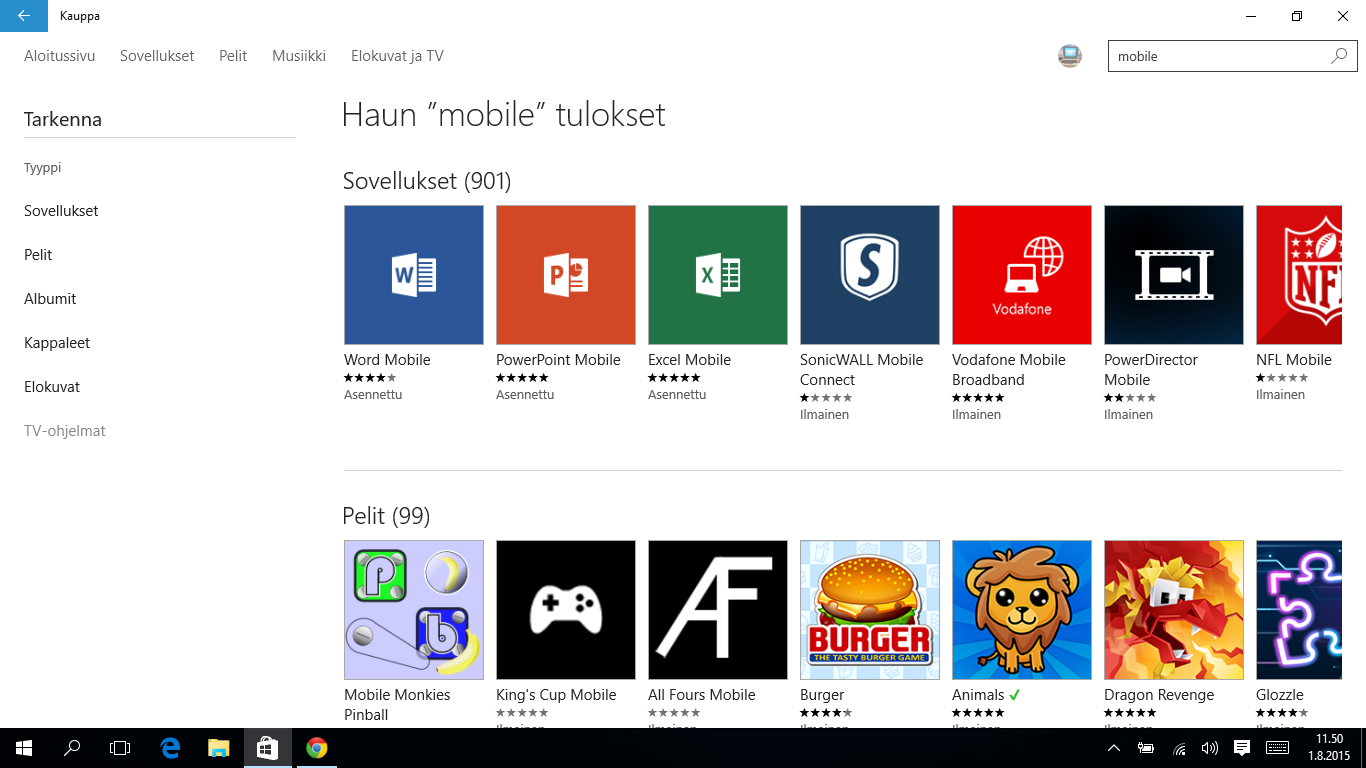
In case you upgraded to Windows10 and happen to own a tablet or laptop with touch screen you can download Word, Excel and PowerPoint mobile versions in Store for free. All you need is Microsoft Account to make apps save files to Microsoft OneDrive.

So browse your new and shiny Windows 10 and enter Store-app. Type search word "mobile" (without citations) and install three essential and free of charge apps on your Windows 10.

Use search word "mobile"

Word Mobile

perjantai 31. heinäkuuta 2015

How did GRUB survive Windows 10 upgrade?

My Dell Latitude E6420 has two operating systems side by side. First there was Windows 7. Then came Ubuntu Linux. They both have been living in perfect harmony for many years.

Windows 10 came available this week. Off I went and upgraded (did not do a fresh install!) Windows 7 to the latest operating system from Microsoft. During the installation I thought GRUB would not be there anymore. That didn't happen. When PC booted again, GRUB was the first one to greet me.

Keep in mind my PC has so called "old school" BIOS (not UEFI). Dual-boot still works and I'm grateful for that. For example installing Linux-based mobile operating systems on my Nexus phone is IMHO so much easier via Linux. That's why dual-boot is so important for me.

Upgrading from Windows 7 to Windows 10

keskiviikko 29. heinäkuuta 2015

Dell Latitude E6420 upgraded from Windows 7 to Windows 10

Windows 10 came available earlier today (on July 29th). I wanted to see if it was possible to upgrade from Windows 7 to the latest from Microsoft - Windows 10.

The first thing to do was to force Windows 7 to download and start install of Windows 10. Read my blog to see how the trick is done.

The rest was not in my hands. Windows 10 setup program took over. There was nothing one could do but pray. It took longer than normally since there were many applications, files and folders in my Windows 7. In addition I had four accounts. Setup went on smoothly. Finally, Windows 10 was there.

Below you can see my Desktop before and after. Not very surprising? Yes, I guess it's not. However the gotcha was to find out whether Windows 10 would install on top of Windows 7 or not. Well, there you have it. I must admit I hate the idea of registry which is in poor condition. And that's what worries me now. If my Dell doesn't work as quick as it did when Windows 7 was there then I have to make a fresh install of Windows 10.

Before

After

Write Windows 10 on USB stick the official way

Microsoft is offering a tool which downloads and writes Windows 10 on USB stick. here is how:
  • Point your browser here: https://www.microsoft.com/en-us/software-download/windows10
  • Download the tool and run it as administrator.
  • Follow the instructions on screen. You may choose between 32- and 64-bit versions of Windows 10. or you can pick up both of them. There are also different Windows versions available (Windows 10 Home, Windows 10 Pro etc.).
WARNING! BE CAREFUL WHAT YOU DO WITH YOUR WINDOWS 10 USB STICK! 

READ OTHER SOURCES HOW TO MAKE WINDOWS 10 SETUP ACCEPT YOUR WINDOWS 7/8.1 PRODUCT KEY!

Force your PC to download and install Windows 10

If feeling impatient force your PC to download and install Windows 10. Here is how:

  • Make sure you are receiving updates automatically.
  • Delete all files and folders under folder C:\Windows\SoftwareDistribution\Download
  • Open Command Prompt (cmd.exe) and run as administrator: wuauclt.exe /updatenow
  • Download starts and leads to Windows 10 install. Be sure to back up your PC beforehand!

Remember that you are upgrading at your own risk!

Acer W4-820 upgraded from
Windows 8.1 to Windows 10

Migrating from Windows 8.1 to Windows 10 went well

As soon as Windows 10 came available I forced my Acer W4-820 -tablet to download and install Windows 10 on top of Windows 8.1. You can read how anyone can make PC fetch the files needed and boot up the latest operating system from Microsoft.

What I wanted to see was the migration from one Windows to another. It was never before advised to install new operating system on top of another. Well, install went just fine and took about 45 minutes. Afterwards Windows 10 downloaded drivers and as fas as I know special software for tablet use. How do I know? Icons got bigger. Now it's easier to tap them.

So far Acer W4-820 has behaved ok (about 1-2 hours ;D). It's up to Microsoft from now on. What I've heard is Microsoft will force all of us to receive updates for Windows 10. Let's hope all those updates work well!


Näin pakotat tietokoneesi lataamaan Windows 10:n ja aloittamaan asennuksen

Windows 10 on julkaistu. Mikäli haluat ladata sen heti ja asentaa vanhemman Windows päälle (Windows 7 tai 8.1), toimi seuraavasti:

  • Varmista, että käytät virallista versiota Windowsista (ei siis mitään piraatteja).
  • Tyhjennä kansio C:\Windows\SoftwareDistribution\Download
  • Aja seuraava komento komentokehotteessa pääkäyttäjänä: wuauclt.exe /updatenow
  • Windows 10:n latauksen pitäisi alkaa ja kansio C:\Windows\SoftwareDistribution\Download täyttyä. Kannattaa siirtyä tarkkailemaan Ojauspaneelin Windows Update -sovellusta. Asennus alkaa latauksen jälkeen.
Acer W4-820 -tabletti siirtymässä
Windows 8.1:stä Windows 10 -versioon.


Näin teet virallisen Windows 10 -asennustikun

Windows 10 on julkaistu. Mikäli tarvitset asennustikkua, toimi seuraavasti:
  • Siirry osoitteeseen https://www.microsoft.com/en-us/software-download/windows10 .
  • Lataa työkalu, jonka avulla voi luoda Windows 10:n sisältävän asennusmuistitikun.
  • Varaa riittävän iso tikku. Minun tapauksessani päätin sisällyttää molemmat eli 32- ja 64-bittiset Windows 10:t tikulle ja tarvitsin tilaa 6 Gt. HUOM! Etsi tuoteavain (= product key) ennenkuin aloitat Windows 10:n asennuksen.
VAROITUS: LUE ENSIN MUISTA LÄHTEISTÄ, MITEN SÄILYTÄT VANHAN WINDOWS 7/8.1:N TUOTEAVAIMEN NIIN, ETTÄ SAAT AKTIVOITUA WINDOWS 10:N. TÄSTÄ LINKISTÄ LISÄÄ TIETOA!

ÄLÄ SIIS VÄLITTÖMÄSTI TYHJENNÄ KIINTOLEVYÄ VAAN SYÖ PURKKA JA JUO KUPPI KAHVIA!

ENNENKAIKKEA ÄLÄ TEE KOKEITA NK. TUOTANTOKONEELLASI ELI SILLÄ, JOLLA PITÄÄ PÄÄSTÄ ESIM. PANKKIIN.

Lataa työkalu ja asenna se
  • Työkalun käyttö on suoraviivaista. Seuraa ao. kuvia:


tiistai 28. heinäkuuta 2015

Three PCs waiting for Windows 10 upgrade

At the moment there are three PCs at home waiting for Windows 10 upgrade. They are all in different situations:

  • Acer Iconia W510 (touch screen device) was once delivered with Windows 8. When Windows Insider Program started, I decided to let Windows 8/8.1 go and installed Windows 10 Preview on Acer. Ending up to pre-version 10240 Acer is now waiting for the final version of Windows 10. And of course after that Acer will continue to receive (infinite?) updates so the Insider-story goes on and on...
  • Dell Latitude E6420 is running Windows 7. It has many accounts and a lot of applications installed. It will be interesting to see IF Windows 10 runs smoothly on top of Windows 7. It was never advised before to do it that way...
  • Acer W4-820 is my Windows 8.1 -based tablet. I want to see two things: a) how Windows 10 installs on top of Windows 8.1 b) is Windows 10 made for touch screens or not (I guess it's not)?

So, Microsoft. Let loose! Gimme that operating system! I promise to wake up early in the morning (European time) to see if you have passed me the chance to install your new software.


Windows 10 on the way - image downloaded and system accepted by Microsoft

My Windows 7 is not that far away from a major upgrade - Windows 10. There are two things I've noticed so far:

  • Encrypted ~ 2,5 GB image showed up (see picture below)!
  • Microsoft says my Dell Latitude E6420 and all installed apps are compatible with Windows 10 (see picture below). In addition read my earlier blog post concerning reservation update.

All set! It's up to Microsoft to decide if I'm allowed to upgrade my Windows 7 to Windows 10 already tomorrow. Let's hope for the best!

install.esd is the name of the encrypted image

Microsoft remotely tested my PC and all the apps...

torstai 25. kesäkuuta 2015

Windows Insiders - puppets on a string

According to Microsoft Windows Insiders are allowed to continue testing of Windows 10 Preview as long as they like. After the RTM-version of Windows 10 is published Preview is no longer there. However Insiders will take part in continuous testing of Windows 10. In a way there will always be a preview version available.

I feel like I'm a puppet on a string. Microsoft gets all the information and in turn my PC is running an OS with a lot of bugs. In addition the next Windows (after Windows 10) will be charged monthtly like Office 365. Insiders are the ones that Microsoft needs to get through their testing cycles what comes to the future versions of Windows. I feel bad. I don't want to pay for Windows every month and don't want to test that sort of software.

My prediction is there will be less Windows users in the future than there is now. People have less money to spend and they don't want pay for Windows every month. Selling operating systems WAS a good business for a while, not anymore.


torstai 18. kesäkuuta 2015

How to run Android on Geeksphone Peak

Geeksphone Peak's original idea was to run Firefox OS. It seems Geeksphone is not supporting Peak anymore. I'm not 100% sure about that though.

So I decided to install Android on Geeksphone Peak. Many people have done it before and now was my turn.
  • I had my Ubuntu-based PC ready-made for flashing. This means tools like adb and fastboot were already installed before I started.
  • The phone needed to be in Debugging Mode.
  • In order to get to recovery mode one has to keep down VolUp, VolDown and On/Off buttons at the same time. 
  • The files needed are found here.
  • Once files were unzipped, Terminal app with superuser privileges were needed.
  • The commands which flash Android on Geeksphone Peak:
    • fastboot flash boot boot.img
    • fasboot flash system system.img
    • fastboot flash userdata userdata.img
    • fasboot reboot
After booting Android 4.0.4 started. My Peak feels much faster than with Firefox OS inside. Sorry to say but both Firefox OS and Android on Geeksphone Peak are dead ends. I am not able to update neither OS. I guess there is a problem with the hardware which is not modern enough. However, I'm glad there are two (older) operating systems to choose from (Firefox OS 2.2 and Android 4.0.4).

 
GP Peak and Android 4.0.4 


torstai 11. kesäkuuta 2015

Summertime - and the Internet-living is easy?

Many people in Finland will soon leave for their summer cottages. 4 weeks vacation is about to start. Ok, you might not expect to find an indoors lavatory or running water when entering the countryside. However one thing must work the same way as at home. What's that? Sauna? No doubt! I have *the Internet* in mind.

So how to get commected? One has to decide how to receive and send information over 3G/4G -networks AND how to share connection with other family while staying in the countryside. Let's see the options:
  • Share your mobile phone connection (most phones support this)
    • Not very handy as your mobile phone phone is not sitting on the table all the time
    • batteries will soon get empty
  • Share 3G/4G -modem with others
    • Not very handy either. I find it difficult to share my connection in Windows. Besides an extra SIM-card is needed.
    • A bit old-fashioned
  • Buy a modem with proper antennas
    • Better but not perfect. Electricity is still needed.
This goes to show how dependent we are on Internet connection. My conclusion is: try to re-event your family. Especially in Finland where summers are light and winters dark it's time to enjoy outdoors sports etc. There is enough time to use Internet during the winter.


lauantai 6. kesäkuuta 2015

Will iOS 9 support iPhone 4S and iPad Mini (1st gen)?

On June 8th at 10 am PDT Apple will keep it's annual summerly keynote. iPhone-, iPad- or MacBook-owners: you can see it live here. In case you are using a PC, try one of those live blogs. If you miss the event you still can read for example Google news to keep yourself updated.

My concern is iOS9. Will it become available for my iPhone 4S and iPad Mini (1st gen)? In case it does is it a stripped down version of iOS for older devices? In addition my daughter has an iPad 2. Will it be completely left out? So stay tuned for more information!

iPad 2


Windows 10 reservation update (KB3035583) not there? Try this!

Microsoft claims Windows 10 is worth reserving beforehand. That way - according to Microsoft - you can avoid "traffic jams" when Windows 10 becomes available. Hmm, if they let Windows 10 loose on July 29th how can one get the image beforehand? I don't get it. Will Microsoft send an encrypted 3 GB update to my Windows 8.1 tablet? That remains to see...

Ok, I want to give Windows 10 a go. My Windows 7 already received a reservation update but my Windows 8.1 tablet didn't. You can manually install the update and force your Windows 8.1 to show you the reservation. Follow these steps:

1. Uninstall any existing KB3035583 and restart PC

2. Download kb3035583 cab file

x86:

http://download.windowsupdate.com/d/msdownload/update/software/updt/2015/05/windows8.1-kb3035583-x86_dc717b43d95c7fd7c12fee2f13e0b17a412e41ee.cab

x64:

http://download.windowsupdate.com/d/msdownload/update/software/updt/2015/05/windows8.1-kb3035583-x64_569671257f46c76e5f5d2f53b1c35500447ad302.cab

3. Copy cab file to C:\temp

4. Open command prompt with administrator rights

5. Copy and paste the following commands in command prompt

x86:

DISM /Online /Add-Package /PackagePath:c:\temp\windows8.1-kb3035583-x86_dc717b43d95c7fd7c12fee2f13e0b17a412e41ee.cab

x64:

DISM /Online /Add-Package /PackagePath:c:\temp\windows8.1-kb3035583-x64_569671257f46c76e5f5d2f53b1c35500447ad302.cab

6. After the cab file installed the Windows 10 icon will pop up on taskbar. If not restart your PC and hope for the best!


Click the Windows-icon and make a reservation of Windows 10